Quantity Table
Introduction
Quantity tables are 2-dimensional tables with quantity data of the same type. They can be regarded as generic data containers, suitable for data interfaces or method input types. In a sense, it acts like a MatrixNxM without the ability to carry out matrix and vector calculations. Hadamard (entry-by-entry) operations on quantity tables are supported.
The QuantityTable supports dense storage in a double[] or float[] array, or sparse storage, where values are stored with an integer-based row-column index and a double or float value. Since the sparse storage involves quite some overhead, tables need to have a significant percentage of 0-values (40-50% or more) for using sparse storage to make sense.
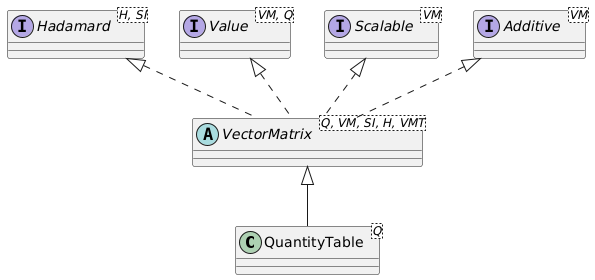
Quantity table operations
A QuantityTable implements the Hadamard interface for entry-by-entry operations. These include:
invertEntries(): Invert each entry of the table (1/value), where the unit will also be inverted. The inversion of a the entries of aDurationquantity table will result in a quantity table of the same size (number of rows and columns), with a unit of1/s, corresponding to aFrequency.multiplyEntries(QuantityTable other): Multiply all entries of this quantity table with those of another quantity table of the same size (but generally containing values of another quantity).divideEntries(QuantityTable other): Divide all entries of this quantity table by those of another quantity table of the same size (but generally containing values of another quantity).multiplyEntries(Quantity<?, ?> quantity): Multiply all entries of this quantity table with the provided quantity.divideEntries(Quantity<?, ?> quantity): Divide all entries of this quantity table by the provided quantity.
All Hadamard operations result in a new instance of a QuantityTable with a new unit, but with the same number of rows and columns.
The result of a Hadamard operation on, e.g. a QuantityTable<Duration> will typically be a QuantityTable<SIQuantity> since the inverse operation, multiplication or division will result in a QuantityTable with a unit that is unknown beforehand and cannot be determined by the compiler. In the above example of invertEntries for a Duration quantity table, the resulting quantity table can be transformed into a proper QuantityTable<Frequency> using the as(Frequency.Unit.Hz) method. Note that the resulting QuantityTable<Frequency> is a new instance of the table, and the original QuantityTable remains unchanged.
The transpose() method returns the transposed quantity table, where rows and columns have been swapped. A transposed quantity table has the same displayUnit as the matrix.
Furthermore, a quantity table is additive, which means that two tables of the same size and same quantity can be added to and subtracted from each other. Quantity tables also implement the Scalable interface, which exposes the scaleBy(double factor) and divideBy(double factor) methods, scaling the entries of the quantity table by factor, respectively 1.0 / factor.
The generic methods of a QuantityTable are:
int rows()returns the number of rows of the quantity table.int cols()returns the number of columns of the quantity table.getDisplayUnit()returns the display unit of the entireQuantityTable.boolean isRelative()returns whether the underlyingQuantityis relative or not. Note thatQuantityTableonly stores relative quantities.boolean isAbsolute()returns whether the underlyingQuantityis absolute or not. Note thatQuantityTableonly stores relative quantities.transpose()returns a newQuantityTablewhere the rows and columns are swapped.qt1.add(qt2)returns a newQuantityTablewhere all entries ofqt2have been added to the corresponding entries ofqt1. ThedisplayUnitis taken fromqt1. The number of rows and columns ofqt1andqt2have to be equal, of course.qt1.subtract(qt2)returns a newQuantityTablewhere all entries ofqt2have been subtracted from the corresponding entries ofqt1. ThedisplayUnitis taken fromqt1. The number of rows and columns ofqt1andqt2have to be equal, of course.qt.scaleBy(double factor)returns a newQuantityTablewhere all entries ofqthave been scaled byfactor. ThedisplayUnitremains unchanged.qt.divideBy(double factor)returns a newQuantityTablewhere all entries ofqthave been scaled by1.0/factor. ThedisplayUnitremains unchanged.
Obtaining values of quantity table entries
Several methods exist to get access to the entries of a QuantityTable. When single entries, rows or columns are retrieved, two versions of the methods exist: a version where the row and column number are 0-based, and a version where the row and column number are 1-based. The 1-based methods have a name that starts with m for matrix, since the entry numbering of a matrix start with m11, and not with m00. So, there is an si(row, col) method where row ranges from 0 to table.rows()-1 and col ranges from 0 to table.cols()-1, and an msi(mRow, mCol) method where mRow ranges from 1 up to and including table.rows() and mCol ranges from 1 up to and including table.cols.
Quantity-based value methods return a value Q that is consistent with the quantity stored in the QuantityTable. Suppose qt is a QuantityTable<Mass>. The result of the operation qt.get(1,3) will then be a strongly typed Mass quantity. The letter Q in the methods below indicates that strongly typed quantity such as Mass.
A QuantityTable contains the following methods to obtain its values:
SI-based value methods
double[][] getSiGrid()returns a 2-dimensionaldouble[][]array with the SI values of the entries in the quantity table.double[] getSiArray()returns the values of the quantity table in SI-units as a row-majordouble[]array with the same length as the quantity table. This means that for a quantity table with n rows and m columns, the data is stored as [a11, a12, ..., a1m, a21, a22, ..., a2m, ..., an1, an2, ..., anm].double si(int row, int col)returns the SI value of the entry at the 0-based row and column.double msi(int mRow, int mCol)returns the SI value of the entry at the 1-based row indicated bymRowand 1-based column indicated bymCol.
Quantity-based value methods
Q[][] getScalarGrid()returns a 2-dimensional strongly typed quantity array that represents the quantity table. The quantities in the array will all have the samedisplayUnitas theQuantityTable.Q[] getScalarArray()returns a 1-dimensional strongly typed row-major quantity array that represents the quantity table. The quantities in the array will all have the samedisplayUnitas theQuantityTable.Q get(int row, int col)returns the quantity representation of the entry at the 0-based row and column. The returnedQuantitywill have the samedisplayUnitas theQuantityTable.Q mget(int mRow, int mCol)returns the quantity representation of the entry at the 1-based row indicated bymRowand 1-based column indicated bymCol. The returnedQuantitywill have the samedisplayUnitas theQuantityTable.
Retrieving quantity table rows
VectorN.Row getRowVector(int row)retrieves the quantity table row at the 0-basedrowas a row-vector with the samedisplayUnit.VectorN.Row mgetRowVector(int mRow)retrieves the quantity table row at the 1-basedmRowas a row-vector with the samedisplayUnit.Q[] getRowScalars(int row)retrieves the quantity table row at the 0-basedrowas an array of quantities, where the quantities in the array have the samedisplayUnitthe quantity table.Q[] mgetRowScalars(int mRow)retrieves the quantity table row at the 1-basedmRowas an array of quantities, where the quantities in the array have the samedisplayUnitas the quantity table. Note that the resultingQ[]array is 0-based.double[] getRowSi(int row)retrieves the quantity table row at the 0-basedrowas adouble[]array with SI values.double[] mgetRowSi(int mRow)retrieves the quantity table row at the 1-basedmRowas adouble[]array with SI values. Note that the resultingdouble[]array is 0-based.
Retrieving quantity table columns
VectorN.Col getColumnVector(int col)retrieves the quantity table column at the 0-basedcolas a column-vector with the samedisplayUnit.VectorN.Col mgetColumnVector(int mCol)retrieves the quantity table column at the 1-basedmColas a column-vector with the samedisplayUnit.Q[] getColumnScalars(int col)retrieves the quantity table column at the 0-basedcolas an array of quantities, where the quantities in the array have the samedisplayUnitas the quantity table.Q[] mgetColumnScalars(int mCol)retrieves the quantity table column at the 1-basedmColas an array of quantities, where the quantities in the array have the samedisplayUnitas the quantity table. Note that the resultingQ[]array is 0-based.double[] getColumnSi(int col)retrieves the quantity table column at the 0-basedcolas adouble[]array with SI values.double[] mgetColumnSi(int mCol)retrieves the quantity table column at the 1-basedmColas adouble[]array with SI values. Note that the resultingdouble[]array is 0-based.
Mathematical operations for QuantityTable
A QuantityTable implements several mathematical operations. The most important ones are:
Q mean()returns the mean quantity value of the entries of theQuantityTableas a strongly typedQuantity.Q min()returns the minimum quantity value of the entries of theQuantityTableas a strongly typedQuantity.Q max()returns the maximum quantity value of the entries of theQuantityTableas a strongly typedQuantity.Q median()returns the median quantity value of the entries of theQuantityTableas a strongly typedQuantity. The median value is the value of the middle entry when all entries have been sorted on their SI values. When the number of entries in the quantity table is even, the average of the two values that together make up the middle is returned.Q sum()returns the sum of the entries of theQuantityTableas a strongly typedQuantity.M negate()returns aQuantityTableof the same type and size where all entries \(x_{ij}\) have been set to \(-x_{ij}\).M abs()returns aQuantityTableof the same type and size where all entries \(x_{ij}\) have been set to \(|x_{ij}|\).int nonZeroCount()andint nnz()both return the number of non-zero entries in the quantity table.
Transforming the QuantityTable
QuantityTable objects do not implement matrix operations such as determinant, matrix multiplication, etc. If a QuantityTable at some point needs to be used for matrix operations, the asVector and asMatrix methods can transform the QuantityTable into a Matrix or column or row Vector of any of the types. For this, the QuantityTable implements the asMatrix1x1(), asMatrix2x2(), asMatrix3x3(), asMatrixNxN(), asMatrixNxM(), asVector1(), asVector2Row(), asVector2Col(), asVector3Row(), asVector3Col(), asVectorNRow(), and asVectorNCol() methods. These methods will check the consistency of the quantity table size with the desired vector or matrix type at runtime. After the transformation, the resulting vector or matrix is available for algebra operations.
Reversely, Matrix or column or row Vector instances can all be turned into a QuantityTable with the asQuantityTable() method.
QuantityTable definition and storage
The QuantityTable class can be used to represent quantity tables of any size (1x1 and up). Data can be stored as single-precision float variable, or as double-precision double values. Both dense storage (store every number) and sparse storage (only store non-zero values) are possible.
Several methods exist to instantiate a QuantityTable.
The DataGridSi-based methods store the data in the dataGridSi object, which can be DenseDoubleDataSi, SparseDoubleDataSi, DenseFloatDataSi, or SparseFloatDataSi. These objects are instantiated through one of their of(), ofSi() or constructor methods. For many of and ofSi methods and the constructor, the number of rows and columns of the quantity table need to be provided for the DataGridSi object to know the shape of the quantity table. A double[6] array of SI values can represent a 2x3 quantity table, but also a 3x2 quantity table or a 1x6 or 6x1 quantity table. All four shapes can be stored in the DataGridSi object by providing the number of rows and columns.
The array-based methods use a row-major array. This means that the data is presented "row-by-row", so, {m11, m12, m13, m21, m22, m23} for a 2x3 quantity table. A (r,c) value is retrieved by m[index], index = r * cols() + c where r, c are 0-based indices.
The grid-based methods count the rows in the 'outer' (first) array [r][], and the columns in the 'inner' second array [][c]. A (r,c)value is retrieved by m[r][c]. 'Ragged' grids are not allowed and result in an IllegalArgumentException.
new QuantityTable<Q>(DataGridSi dataSi, UnitInterface displayUnit)
creates aQuantityTablebased on aDataGridSistorage object. More information can be found in the storage section.QuantityTable.of(DataGridSi dataSi, UnitInterface displayUnit)
creates aQuantityTablebased on aDataGridSistorage object. More information can be found in the storage section.QuantityTable.of(double[] dataInUnit, int rows, int cols, UnitInterface unit)
creates aQuantityTablebased on a row-major array with values expressed in the given unit. The length of the array needs to be equal torows * cols.QuantityTable.of(double[][] gridInUnit, UnitInterface unit)
creates aQuantityTablebased on a grid (array of arrays) with values expressed in the given unit. The grid cannot be 'ragged'.QuantityTable.ofSi(double[] dataSi, int rows, int cols, UnitInterface displayUnit)
creates aQuantityTablebased on a row-major array with SI values for the quantities. The length of the array needs to be equal torows * cols.QuantityTable.ofSi(double[][] gridSi, UnitInterface displayUnit)
creates aQuantityTablebased on a grid (array of arrays) with with SI values for the quantities. The grid cannot be 'ragged'.QuantityTable.of(Q[] data, int rows, int cols)
creates aQuantityTablebased on a row-major array with quantities. The length of the array needs to be equal torows * cols.QuantityTable.of(Q[][] grid)
creates aQuantityTablebased on a grid (array of arrays) with with quantities. The grid cannot be 'ragged'.
Formatting and printing quantity tables
Quantity tables have a toString() method that returns a multi-line String representation of the table using a (localized) floating point representation of the values of the table using the display unit, followed by a space and the (localized) unit on the last line of the table. Formatting options are available through the format method:
String toString()returns the localized string representation of the quantity table, using its current display unit.String format()formats the quantity table according to the current locale, and using its current display unit.String format(UnitInterface displayUnit)returns the localized string representation of the quantity table, using the provided unit.String format(TableFormat format)formats the quantity table using the provided format parameters.
See the section Formatting for more information on how to use the TableFormat options.