(Relative) Quantity
A (physical) quantity is a property of a material or system that can be quantified by measurement. A physical quantity can be expressed as the combination of a value (magnitude) and a unit. For example, the physical quantity energy can be quantified as x joule where x is the value and joule is the unit.[1]
Every quantity in DJUNITS needs a unit. One quantity can be expressed using multiple units. Typically the unit is defined as an inner class of the quantity class. As a standard the name BASE, or SI is used for the default unit and it should be public, static and final.
A Quantity is a Number and can therefore be used in any piece of code where a Number is expected. When using the methods from Number, such as doubleValue(), the value is always returned in SI or BASE units.
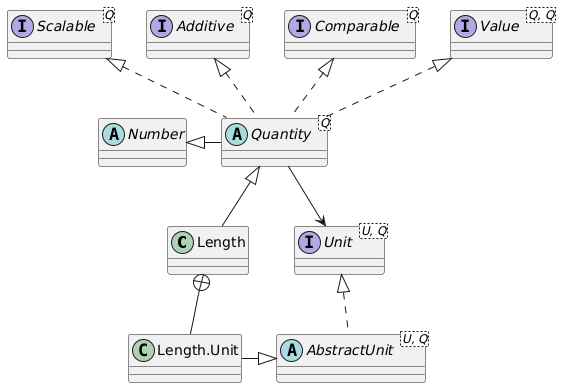
Note that next to the Quantity, which is relative, an AbsoluteQuantity exists. Absolute quantities are defined with respect to to a reference point, whereas relative quantities do not have a reference point. An Angle of 10 degrees is not fixed in space, whereas a Direction of 10 degrees relative to the 'NORTH' reference does represent a fixed direction in space. The same holds for Temperature versus TemperatureDifference, Position versus Length, and Time versus Duration. For more information about absolute quantities, see the Absolute Quantity page.
Constructing a quantity
The constructor of a quantity like a Duration is straightforward: it takes a value and a unit, where the value is expressed in the provided unit:
Duration dur1 = new Duration(10.0, Duration.Unit.min);
Several static ofSi(), of() and valueOf() methods are available as well:
var dur2 = Duration.ofSi(10.0); // a duration of 10 seconds
var dur3 = Duration.ofSi(10.0, Duration.unit.min); // 10 seconds, display unit in minutes
var dur4 = Duration.of(24.0, Duration.Unit.h); // a duration of 24 hours
var dur5 = Duration.of(24.0, "h"); // a duration of 24 hours
var dur6 = Duration.valueOf("20 min"); // a duration of 20 minutes
When a value is constructed using a certain unit, this unit is also used as the display unit.
Requesting information of the quantity
Quantities are strongly typed, and many operations on quantities are possible. A couple of examples are (where Q denotes the quantity such as Area):
UnitInterface getDisplayUnit()to ask the current unit in which the quantity is displayed.double si()orsito give the value of the quantity expressed in SI or BASE units.double getInUnit()to get the value expressed in the display unit that is stored in theQuantity.double getInUnit(targetUnit)to get the value expressed in the given target unit.doubleValue(),floatValue(),intValue(), etc. are provided sinceQuantityextendsNumber.- logical operators such as
lt,le,eq,ne, to check whether one quantity is, e.g., bigger or smaller than another one. - logical operators such as
lt0,le0,eq0,ne0to check whether one quantity is, e.g., bigger or smaller than zero. These methods are not available for absolute quantities. String toString()with several variants for formatting the unit, so it can be expressed, e.g., askgm/s2orkg.m.s-2or as a HTML stringkg.m.s<sup>-2</sup>, where the latter displays as kg.m.s-2.String getName()gives the (localized) name of the quantity.SIUNit siUnit()returns the SI-unit of the quantity, such as kg·m/s2.
Instantiating quantities
The constructor is the standard way to instantiate a quantity. The constructors are typically as follows, where Q denotes the quantity class`:
Q(double valueInUnit, UnitInterface unit)instantiates a new quantity withvalueInUnitexpressed in the givenunit. Example:new Area(10.0, Area.Unit.are).Q(double value, UnitInterface unit, boolean useSi)instantiates a unit, where thevaluewill either be in SI units whenuseSiistrue, or expressed in theunitwhenuseSiisfalse.Q.of(double valueInUnit, UnitInterface unit)instantiates a new quantity withvalueInUnit, expressed in the given unit,Area.of(200.0, Area.Unit.ac).Q.of(double valueInUnit, String unitString)instantiates a new quantity withvalueInUnit, where the unit string will be parsed into the unit, e.g.,Area.of(80.0, "m2").Q.ofSi(siValue)instantiates a new quantity with the given SI or base value. The SI or base unit will also act as the display unit.Q.ofSi(siValue, displayUnit)instantiates a new quantity with the given SI or base value, and the given display unit.Q.valueOf(String text)parses the string with value and unit. The example is a quantity of the correct type, e.g.Area.valueOf("10.0 m2").
Two instance methods are also present, that are typically used internally to instantiate a new quantity from an existing one:
Area instantiateSi(siValue)instantiates a new quantity withsias its SI or base value.Area instantiateSi(siValue, displayUnit)instantiates a new quantity withsias its SI or base value, but for printing, thedisplayUnitwill be used.Area instantiate(valueInUnit, unit)instantiates a new quantity withvalueInUnitexpressed in the givenunit.
Operations on the quantity
(Relative) quantities can always be added to and subtracted from other relative quantities of the same type, independent of their unit. This means that a Length quantity defined in miles can be added to a Length quantity defined in kilometers, but a Length quantity cannot be added to a Speed quantity. Relative quantities can also be scaled, negated, and the reciprocal of a quantity can be calculated.
Q add(Q increment)returns a new quantity where the SI value has been increased by the SI value fromincrement. The display unit of the resulting value is the same as the display unit of the quantitypwhenp.add(q)is called.Q subtract(Q decrement)returns a quantity where the SI value fromdecrementis subtracted from the current quantity. The display unit of the resulting value is the same as the display unit of the quantitypwhenp.subtract(q)is called.
Multiplication and division of quantities is also possible. A reciprocal function for the quantity (with a unit of one divided by the original unit) is provided as well. Some multiplication and division functions lead to a known quantity; Length * Length -> Area, Length / Duration -> Speed, 1 / Duration -> Frequency. Others are not pre-programmed, and lead to an SIQuantity with an SIUnit. E.g., 1 / Area -> SIQuantity with a unit 1/m2.
SIQuantity multiply(Quantity quantity)yields the product of a quantity with another quantity.SIQuantity divide(Quantity quantity)yields the division of a quantity by another quantity.SIQuantity product(Quantity quantity1, Quantity... quantities)is a static method to multiply multiple quantitities with each other.SIQuantity reciprocal()returns a quantity with the reciprocal value (1/si) and the reciprocal unit.
Several functions can be applied to a quantity, yielding a new quantity with the same display unit as the caller.
Q abs()returns a quantity with the absolute value of the SI value.Q divideBy(double factor)returns a new quantity with an SI value ofsi/factor.Q interpolate(Q zero, Q one, double ratio)returns a value between quantityzeroand quantityonewhere the SI value iszero.si * (1.0 - ratio) + one * ratio. So, whenratiois zero, the outcome will be the value of thezeroquantity, and whenratiois one, the outcome will be the value of theonequantity. The value ofratiohas to be between zero and one, so extrapolation is not possible with this method.Q max(Q q1, Q... quantities)returns the maximum value (using the SI value) of the provided quantities.Q mean(Q q1, Q... quantities)returns the mean value (using the SI value) of the provided quantities.Q min(Q q1, Q... quantities)returns the minimum value (using the SI value) of the provided quantities.Q negate()returns a quantity with the negated value of the SI value (SI value multiplied by -1).Q scaleBy(double factor)scales the quantity by a dimensionlessfactor, based on the SI value.Q sum(Q q1, Q... quantities)returns the summed value (using the SI value) of the provided quantities.
Typical Quantity constants
The predefined quantities in the library have a standard set of constants for each quantity:
NaNQuantity constant with SI value NaN.NEG_MAXVALUEQuantity constant with SI value -MAX_VALUE.NEGATIVE_INFINITYQuantity constant with SI value NEGATIVE_INFINITY.ONEQuantity constant with SI value 1.0.POS_MAXVALUEQuantity constant with SI value MAX_VALUE.POSITIVE_INFINITYQuantity constant with SI value POSITIVE_INFINITY.ZEROQuantity constant with SI value 0.0.
Especially the values ZERO and ONE are often used, e.g., Speed.ZERO, or LinearObjectDensity.ONE.
Formatting and printing quantities
Quantities have a toString() method that returns a String representation of the quantity using a (localized) floating point representation of the value in the display unit, followed by a space and the (localized) unit. Formatting options are available through the format method:
String toString()returns the localized string representation of a quantity, using its current display unit.String format()formats the quantity according to the current locale, and using its current display unit.String format(UnitInterface displayUnit)returns the localized string representation of a quantity, using the provided unit.String format(QuantityFormat format)formats the quantity using the provided format parameters.
See the section Formatting for more information on how to use the QuantityFormat options.
Examples of Quantity operations
Some examples:
Duration dur = Duration.of(0.5, "s");
Frequency freq = dur.reciprocal(); // 2 Hz
var dur4 = dur.scaleBy(4.0); // 2 s
var dur5 = dur4.negate(); // -2 s
var dur6 = Duration.of(2.0, "min").add(dur.scaleBy(60.0)); // 2.5 min
Quantities can also be multiplied with and divided by quantities of other types. The correct SI-dimension for the resulting quantity is calculated, and for known multiplications and divisions, a quantity of the correct type is returned:
Length length = Length.of(80.0, "km");
Duration hour = Duration.of(1.0, "h");
Speed speed = length.divide(hour);
The value of speed above will be 80 km/h. It will also be strongly typed as a Speed quantity. Because the calculation takes place in SI units, the resulting speed value will be expressed in the SI default unit for speed: m/s. If we want it expressed as km/h, we use:
Speed speed = Speed.ofSi(length.divide(hour).si, Speed.Unit.km/h);
In case the multiplication or division results in a quantity that is not known, an SIQuantity with a unit SIUnit will be returned. See the following example:
Duration s = Duration.of(20.0, "s");
var s2 = s.multiply(s);
Here, s2 will have an internal si-value of 400, and a unit of s^2. The type will be SIQuantity. Suppose, we divide a length by this variable to obtain an acceleration. In that case the compiler does not know that the result will be an Acceleration quantity. We can transform the result to an Acceleration with the as method. This method will give an error if the SI-unit is not of the correct type:
var l = Length.of(10.0, "m");
var a1 = l.divide(s2); // SIQuantity
System.out.println("a1 = " + a1);
System.out.println("a1.class = " + a1.getClass().getSimpleName());
var a2 = a1.as(Acceleration.Unit.m_s2);
System.out.println("a2 = " + a2);
System.out.println("a2.class = " + a2.getClass().getSimpleName());
var a3 = s2.as(Acceleration.Unit.m_s2);
This results in:
a1 = 0.02500000 m/s2
a1.class = SIQuantity
a2 = 0.02500000 m/s2
a2.class = Acceleration
Exception in thread "main" java.lang.IllegalArgumentException:
  Quantity.as (804): Quantity.as(m/s2) called, but units do not match: s2 <> m/s2