Absolute quantity
An absolute quantity contains a value measured from a given reference point. Examples are time with a reference point 1-1-1970 (UNIX epoch) or
a reference point 1-1-0001 (Gregorian calendar time). As an other example, a geographical direction can be defined relative to North or East
as a reference point. Therefore, an absolute quantity is a quantity relative to a defined reference point. Every absolute quantity has its
own type of reference point: a Time has a Time.Reference, and a Position has a Position.Reference. Multiple instances of
reference points can be defined, such as EAST and NORTH in the Direction example. References can be defined relative to each other:
NORTH is defined as having an Angle difference of π/2 rad relative to the EAST reference point.
Absolute quantities therefore have three fields as compared to two fields for a relative quantity:
- the reference point of the correct type (e.g.,
Direction.Reference.EAST). - the relative value in SI or BASE units relative to the reference point (e.g., an
Angleof π/4 rad). - the display unit to use (e.g.,
Angle.Unit.deg).
The above example results in a north-easterly direction, since a positive Angle is defined clockwise when viewed from above.
The relation between (relative) quantities and absolute quantities is sketched in the class diagram below. Note that whereas the absolute quantities are inherited from the AbsQuantity class, we inherit a relative quantity in DJUNITS from the class Quantity, without a 'relative' prefix.
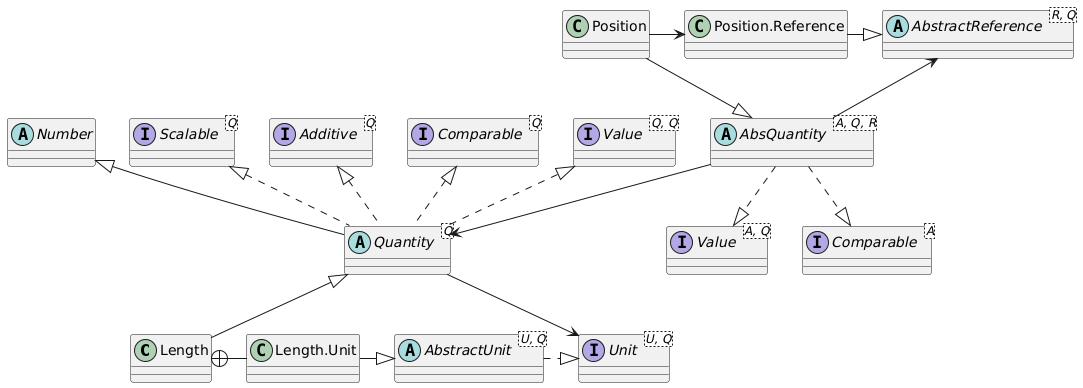
Note that the generic implementation of the functions of an absolute quantity are divided over the
AbsQuantityandComparableAbsQuantityclasses.AbsQuantitycontains the functions that are relevant for all absolute quantities. This does not include the comparators and static functions likelt(),gt(),min()andmax(). The reason is that for theDirection, ameanor agtfunction does not make sense. We cannot say that an absolute angle of 350 degrees is 'greater than' an angle of 0 degrees. Often, a normalization is used to accomplish this, but given the different reference points, normalization is not straightforward. Therefore,Directiondoes not implementComparable, nor does it have the static functions likemax,minandmean.
Operations on absolute quantities
Adding two absolute quantities together makes no sense. Subtracting one absolute quantity from another does make sense (and results in a relative quantity). Subtracting East from North should result in a relative angle of ±90° or ±π/2 rad (depending on the unit used to express the result). An absolute quantity always needs a reference to be useful. Values subtracted from each other need to know their reference to be able to carry out the subtraction. Therefore, the reference is explicitly stored with an absolute quantity.
A relative quantity typically expresses a difference between two (absolute or relative) quantity values. The angle in the example above is a relative quantity. Relative quantities can be added together and subtracted from each other (resulting in relative quantities). Adding a relative quantity to an absolute quantity results in an absolute quantity. Subtracting a relative quantity from an absolute quantity also results in an absolute quantity.
In the geographical example, directions are absolute and angles are relative. Similarly, when applied to lengths, positions are absolute and distances are relative.
Generally, if adding a quantity to itself makes no sense, the quantity is absolute; otherwise it is relative.
| Operation | Operands | Result |
|---|---|---|
| + (plus) | Absolute + Absolute | Not allowed |
| + (plus) | Absolute + Relative | Absolute |
| + (plus) | Relative + Absolute | Absolute |
| + (plus) | Relative + Relative | Relative |
| - (minus) | Absolute - Absolute | Relative |
| - (minus) | Absolute - Relative | Absolute |
| - (minus) | Relative - Absolute | Not allowed |
| - (minus) | Relative - Relative | Relative |
| * (times) | Absolute * Absolute | Not allowed |
| * (times) | Absolute * Relative | Not allowed |
| * (times) | Relative * Absolute | Not allowed |
| * (times) | Relative * Relative | Relative (see Note below) |
| / (divide) | Absolute / Absolute | Not allowed |
| / (divide) | Absolute / Relative | Not allowed |
| / (divide) | Relative / Absolute | Not allowed |
| / (divide) | Relative / Relative | Relative (see Note below) |
Note that when multiplying two relative quantities, the resulting quantity is of a different type: the multiplication of two
Lengthquantities results in anAreaquantity. The same holds for division: dividing aLengthquantity by aDurationquantity results in aSpeedquantity.
Attempts to perform operations that are marked 'Not allowed' are caught at compile time.
Available absolute quantities
All quantities make sense as relative values. The four quantities that also make sense as absolute values are listed in the table below.
| Quantity | Absolute interpretation | Absolute class and Unit |
Relative interpretation | Relative class and Unit |
|---|---|---|---|---|
| Length | Position | Position Length.Unit |
Distance | Length Length.Unit |
| Angle | Direction or Slope | Direction Angle.Unit |
Angle (direction or slope difference) | Angle Angle.Unit |
| Temperature | Temperature | Temperature Temperature.Unit |
Temperature difference | TemperatureDifference Temperature.Unit |
| Time | Time (instant) | Time Duration.Unit |
Duration | Duration Duration.Unit |
Examples
The Temperature absolute quantity assumes the reference Temperature.Reference.KELVIN as the default when it is not
mentioned in the constructor.
Temperature t = new Temperature(0.0, Temperature.Unit.degF);
System.out.println("Temperature t = " + t);

// add 32 degrees Fahrenheit - should be 0 Celsius
System.out.println("\nAdd 32 degrees Fahrenheit - should be 0 Celsius");
TemperatureDifference t32 = new TemperatureDifference(32.0, Temperature.Unit.degF);
Temperature t2 = t.add(t32);
System.out.println("Temperature t2 = " + t2);
System.out.println("t2 in Kelvin   = " + t2.relativeTo(Temperature.Reference.KELVIN)
    .format(Temperature.Unit.K));
System.out.println("t2 in Celsius  = " + t2.relativeTo(Temperature.Reference.CELSIUS)
    .format(Temperature.Unit.degC));

// show that absolute values can be shown relative to different reference points
System.out.println("\nTemperature t  = " + t + ", si = " + t.si());
System.out.println("t in Kelvin    = " + t.format(QuantityFormat.instance()
    .setDisplayUnit(Temperature.Unit.K)
    .setPrintReference().setReferencePrefix(" (relative to 0 ")));
System.out.println("t in Celsius   = " + t.format(QuantityFormat.instance()
    .setDisplayUnit(Temperature.Unit.degC)
    .setPrintReference().setReferencePrefix(" (relative to 0 ")));
This prints:
Temperature t = 0 °F

Add 32 degrees Fahrenheit - should be 0 Celsius
Temperature t2 = 32 °F
t2 in Kelvin   = 273.15 K
t2 in Celsius  = 0 °C

Temperature t  = 0 °F, si = 0.0
t in Kelvin    = 0 K (relative to 0 FAHRENHEIT)
t in Celsius   = 0 °C (relative to 0 FAHRENHEIT)
Note that a Celsius temperature difference can be defined relative to 0 degrees Fahrenheit. Of course, this is typically not done; an absolute temperature in degrees Celsius will typically be defined relative to 0 °C, and similarly, kelvin and degrees Fahrenheit will be defined relative to their 'own' natural reference point. But it is not necessary.