Vector of quantities
Introduction
Vectors and Matrices are one-dimensional and two-dimensional mathematical data containers for Quantity values, where each instance of a Vector or Matrix contains values of one specific quantity. A Vector or Matrix has a displayUnit for the entire vector or matrix. Internally, vectors and matrices store all values in their SI or BASE unit, just like the Quantity.
Larger Vectors and Matrices are implemented in four different ways: Sparse or Dense data storage, combined with Double or Float precision, which gives four combinations. Sparse storage should be used for vectors or matrices that contain many zero values. Dense data storage would, in that case, store all the zeros, whereas in a sparse storage only the numbers unequal to zero are stored, together with an index. As the index adds some overhead, sparse storage only makes sense when the number of zeros is over 50% of the number of entries.
Vector types
Vectors can be defined as row vectors or as column vectors. The difference is especially important for vector-vector multiplications and matrix-vector multiplications. Row and Col are defined as inner classes of the corresponding vectors. Several implementations of vectors exist, which are shown in the UML class diagram below:
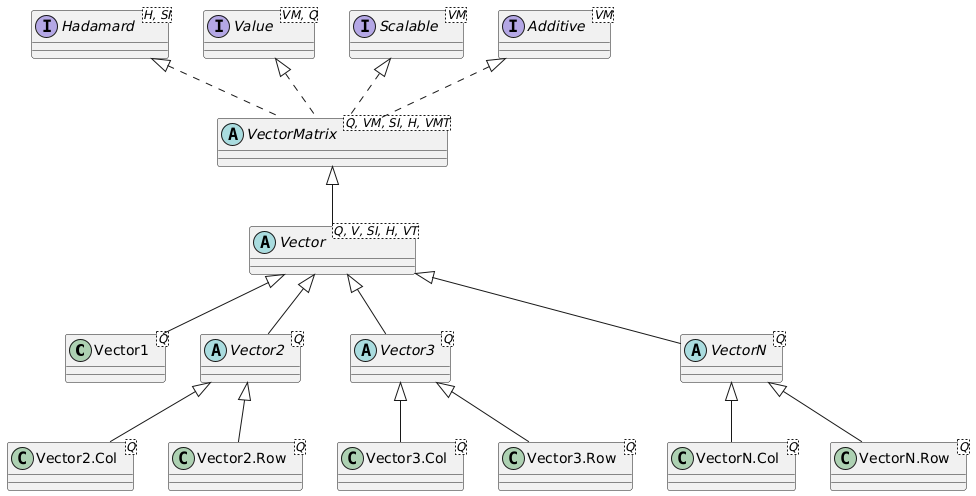
The generic type of Vector of any size is the VectorN class. This vector can use sparse or dense storage, and be populated with single-precision float values or double precision double values. For efficiency reasons, since the VectorN carries some overhead for the flexible data storage, separate classes are defined for Vector1 (no distinction between row and column version), and for Vector2 and Vector3, both with a Row and Col extension.
Vector operations
A Vector implements the Hadamard interface for entry-by-entry operations. These include:
invertEntries(): Invert the vector on an entry-by-entry basis (1/value), where the unit will also be inverted. The inversion of aDurationvector will result in a vector of the same type (row/column) and size, with a unit of1/s, corresponding to aFrequency.multiplyEntries(Vector other): Multiply the entries of this vector on an entry-by-entry basis with those of another vector of the same type and size (but generally containing values of another quantity).divideEntries(Vector other): Divide the entries of this vector on an entry-by-entry basis by those of another vector of the same type and size (but generally containing values of another quantity).multiplyEntries(Quantity<?, ?> quantity): Multiply the entries of this vector on an entry-by-entry basis with the provided quantity.divideEntries(Quantity<?, ?> quantity): Divide the entries of this vector on an entry-by-entry basis by the provided quantity.
All Hadamard operations result in a new instance of the Vector with a new unit, but of the same type (Vector2.Col, Vector3.Row, VectorN.Col, etc.) and with the same size.
The result of a Hadamard operation on, e.g. a VectorN.Row<Speed> will typically be a VectorN.Row<SIQuantity> since the inverse operation, multiplication or division will result in a Vector with a unit that is unknown beforehand and cannot be determined by the compiler. In the above example of invertEntries for a Duration vector, the resulting vector can be transformed into a proper VectorN.Row<Frequency> vector using the as(Frequency.Unit.Hz) method.
If a VectorN is internally of a size congruent with a specific vector type, e.g. Vector2.Row or Vector3.Col, it can be obtained as such using methods such as asVector2Row() or asVector3Col(). Many such methods exist to carry out a transformation between vectors and matrices of various sizes. These methods will check the consistency of the vector size with the desired vector type at runtime. All vectors, irrespective of their size, can be transformed to a QuantityTable using the asQuantityTable() method, and to a MatrixNxM with the asMatrixNxM() method.
If vector-vector multiplication results in a special matrix type, for example multiplying a Vector3.Col by a Vector3.Row resulting in a 3x3 matrix, the resulting MatrixNxM from the calculation can be obtained as a Matrix3x3 using the method asMatrix3x3(). This allows it, for example, to be added to another Matrix3x3.
The Vector class implements the transpose() operation, which transforms a row vector into a column vector and vice versa. The resulting vector will have the same outer class type as the original; the transpose() method on a Vector2.Row will result in a Vector2.Col.
Furthermore, a vector is Additive, which means that vectors of the same type, size, and quantity can be added to and subtracted from each other. It is also possible to add or subtract a fixed Quantity of the correct type to/from the vector. Vectors also implement the Scalable interface, which exposes the scaleBy(double factor) and divideBy(double factor) methods. Since vectors are immutable, all these operations result in a new instance of a vector.
The generic methods of a Vector are:
int rows()returns the number of rows of the vector.int cols()returns the number of columns of the vector.int size()returns the size of the vector; the number of rows for a column vector, or the number of columns for a row vector.boolean isColumnVector()returns whether this vector is a column vector.boolean isRowVector()returns whether this vector is a row vector. Note that aVector1is both a column vector and and row vector.Iterator<Q> iterator()returns aQuantityiterator over the entries of the vector. The iterator is guaranteed to yield the entries ordered by increasing index, and it will yield 0-values for the 0-entries of a sparse vector.getDisplayUnit()returns the display unit that applies to the entireVector.boolean isRelative()returns whether the underlyingQuantityis relative or not. Note thatVectoronly stores relative quantities.boolean isAbsolute()returns whether the underlyingQuantityis absolute or not. Note thatVectoronly stores relative quantities, whereasAbsVectorstores absolute quantities.transpose()returns a newVectorwhere the rows and columns are swapped.v1.add(v2)returns a newVectorwhere all entries ofv2have been added to the corresponding entries ofv1. ThedisplayUnitis taken fromv1. The number of rows and columns ofv1andv2have to be equal, of course.v1.subtract(v2)returns a newVectorwhere all entries ofv2have been subtracted from the corresponding entries ofv1. ThedisplayUnitis taken fromv1. The number of rows and columns ofv1andv2have to be equal, of course.v.scaleBy(double factor)returns a newVectorwhere all entries ofvhave been scaled byfactor. ThedisplayUnitremains unchanged.v.divideBy(double factor)returns a newVectorwhere all entries ofvhave been scaled by1.0/factor. ThedisplayUnitremains unchanged.
Obtaining values of vector entries
Several methods exist to get access to the entries of a Vector. When single entries are retrieved, two versions of the methods exist: a version where the index is 0-based, and a version where the index is 1-based. The 1-based methods have a name that starts with m for matrix, since the entries of a vector start with v1 and not v0 and the entries of a matrix start with m11, and not with m00. So, there is an si(index) method where index ranges from 0 to vector.size()-1, and an msi(mIndex) method where mIndex ranges from 1 up to and including vector.size().
Quantity-based methods return a value Q that is consistent with the quantity stored in the Vector. Suppose v is a Vector3.Row<Mass>. The result of the operation v.mget(1) will then be a strongly typed Mass quantity. The letter Q in the methods below indicates that strongly typed quantity such as Mass.
A Vector contains the following methods to obtain its values:
double[] getSiArray()returns a safe copy of the values of the vector in SI-units as adouble[]array with the same length as the vector.Q[] getScalarArray()returns a 1-dimensional strongly typed quantity array that represents the vector. The quantities in the array will all have the samedisplayUnitas theVector.double si(int index)returns the SI value of the entry at the 0-basedindex.double msi(int mIndex)returns the SI value of the entry at the 1-basedmIndex.Q get(int index)returns the quantity representation of the entry at the 0-basedindex. The returnedQuantitywill have the samedisplayUnitas theVector.Q mget(int mIndex)returns the quantity representation of the entry at the 1-basedmIndex. The returnedQuantitywill have the samedisplayUnitas theVector.
Mathematical operations
A Vector implements several mathematical operations. The most important ones are:
Q mean()returns the mean quantity value of the entries of theVectoras a strongly typedQuantity.Q min()returns the minimum quantity value of the entries of theVectoras a strongly typedQuantity.Q max()returns the maximum quantity value of the entries of theVectoras a strongly typedQuantity.Q median()returns the median quantity value of the entries of theVectoras a strongly typedQuantity. The median value is the value of the middle entry when all entries have been sorted on their SI values. When the size of the vector is even, the average of the two values that together make up the middle is returned.Q sum()returns the sum of the entries of theVectoras a strongly typedQuantity.V negate()returns aVectorof the same type and size where all entries \(x_i\) have been set to \(-x_i\).V abs()returns aVectorof the same type and size where all entries \(x_i\) have been set to \(|x_i|\).Q normL1()returns the L1-norm of the vector's entries, expressed as a quantity. The L1-norm is defined as \(L1=|x_1|+|x_2|+...+ |x_n|\).Q normL2()returns the L2-norm of the vector's entries, expressed as a quantity. The L2-norm is defined as \(L2=\sqrt(x_1^2+x_2^2+...+x_n^2)\).Q normLp(int p)returns the Lp-norm of the vector's entries, expressed as a quantity. The Lp-norm is defined as \(L_p={(x_1^p+x_2^p+...+x_n^p)}^{(1/p)}\)Q normLinf()returns the L∞-norm of this vector's entries, expressed as a quantity. The L∞-norm is defined as \(L_{\infty}=max(|x_1|,|x_2|,...,|x_n|)\).Q norm()returns the default norm for the vector's entries. The default norm is defined as the L2-norm.int nonZeroCount()andint nnz()both return the number of non-zero entries in the vector.
Vector definition and storage
Creating a Vector1
For a Vector1, there is no distinction between a row and column vector. Several methods exist to instantiate a Vector1:
new Vector1<Q>(double xSi, UnitInterface displayUnit)
creates aVector1based on an SI value for the quantity with a displayUnit.Vector1.of(double xInUnit, UnitInterface unit)
creates aVector1based on a value expressed in the given unit, e.g.,60.0, Speed.Unit.km_h.Vector1.of(double[] dataInUnit, UnitInterface unit)
creates aVector1based on an array of length 1 with values expressed in the given unit.Vector1.ofSi(double xSi, UnitInterface displayUnit)
creates aVector1based on an SI value for a quantity with a displayUnit.Vector1.ofSi(double[] dataSi, UnitInterface displayUnit)
creates aVector1based on an array of length 1 with SI values for a quantity with a displayUnit.Vector1.of(Q x)
creates aVector1based on a provided quantity.Vector1.of(Q[] data)
creates aVector1based on an array of length 1 containing a provided quantity.
Creating a Vector2
For a Vector2, a row vector Vector2.Row and a column vector Vector2.Col exist. Several methods exist to instantiate a Vector2. Below, the instantiation methods are given for Vector2.Col. The instantiation methods for a Vector2.Row are analogous.
new Vector2.Col<Q>(double xSi, double ySi, UnitInterface displayUnit)
creates aVector2.Colbased on two SI values for the quantities with a displayUnit.Vector2.Col.of(double xInUnit, double yInUnit, UnitInterface unit)
creates aVector2.Colbased on two values expressed in the given unit.Vector2.Col.of(double[] dataInUnit, UnitInterface unit)
creates aVector2.Colbased on an array of length 2 with values expressed in the given unit.Vector2.Col.ofSi(double xSi, double ySi, UnitInterface displayUnit)
creates aVector2.Colbased on two SI values for the quantities with a displayUnit.Vector2.Col.ofSi(double[] dataSi, UnitInterface displayUnit)
creates aVector2.Colbased on an array of length 2 with SI values for the quantities with a displayUnit.Vector2.Col.of(Q x, Q y)
creates aVector2.Colcontaining the two provided quantities. Thexquantity provides the display unit of the vector.Vector2.Col.of(Q[] data)
creates aVector2.Colbased on an array of length 2 containing the provided quantities. The quantity atdata[0]provides the display unit of the vector.
Creating a Vector3
For a Vector3, a row vector Vector3.Row and a column vector Vector3.Col exist. Several methods exist to instantiate a Vector3. Below, the instantiation methods are given for Vector3.Col. The instantiation methods for a Vector3.Row are analogous.
new Vector3.Col<Q>(double xSi, double ySi, double zSi, UnitInterface displayUnit)
creates aVector3.Colbased on three SI values for the quantities with a displayUnit.Vector3.Col.of(double xInUnit, double yInUnit, double zInUnit, UnitInterface unit)
creates aVector3.Colbased on three values expressed in the given unit.Vector3.Col.of(double[] dataInUnit, UnitInterface unit)
creates aVector3.Colbased on an array of length 3 with values expressed in the given unit.Vector3.Col.ofSi(double xSi, double ySi, double zSi, UnitInterface displayUnit)
creates aVector3.Colbased on three SI values for the quantities with a displayUnit.Vector3.Col.ofSi(double[] dataSi, UnitInterface displayUnit)
creates aVector3.Colbased on an array of length 3 with SI values for the quantities with a displayUnit.Vector3.Col.of(Q x, Q y, Q z)
creates aVector3.Colcontaining the three provided quantities. Thexquantity provides the display unit of the vector.Vector3.Col.of(Q[] data)
creates aVector3.Colbased on an array of length 3 containing the provided quantities. The quantity atdata[0]provides the display unit of the vector.
Creating a VectorN
The VectorN class is used for storing row and column vectors of any length. Data can be stored as single-precision float variable, or as double-preciding double values. Both dense (store every number) and sparse (only store non-zero values) is possible. For a VectorN, a row vector subclass VectorN.Row and a column vector subclass VectorN.Col exist. Several methods exist to instantiate a VectorN. Below, the instantiation methods are given for VectorN.Col. The instantiation methods for a VectorN.Row are analogous.
new VectorN.Col<Q>(DataGridSi dataSi, UnitInterface displayUnit)
creates aVectorN.Colbased on aDataGridSistorage object. More information can be found in the Data Storage section.VectorN.Col.of(DataGridSi dataSi, UnitInterface displayUnit)
creates aVectorN.Colbased on aDataGridSistorage object. More information can be found in the Data Storage section.VectorN.Col.of(double[] dataInUnit, UnitInterface unit)
creates aVectorN.Colbased on an array with values expressed in the given unit. The vector will have the same number of elements as the array.VectorN.Col.ofSi(double[] dataSi, UnitInterface displayUnit)
creates aVectorN.Colbased on an array with SI values for the quantities. The vector will have the same number of elements as the array.VectorN.Col.of(Q[] data)
creates aVectorN.Colbased on an array with quantities. The vector will have the same number of elements as the array. The quantity atdata[0]provides the display unit of the vector.VectorN.Col.of(List<Q> data)
creates aVectorN.Colbased on a list with quantities. The vector will have the same number of elements as the list. The quantity atdata.get(0)provides the display unit of the vector.
Example for Vector instantiation and usage
The example below shows the instantiation and usage of a row vector with 5 entries VectorN.Row:
VectorN.Row<Length> lv1 = VectorN.Row.of(
    new double[] {10, 20.0, 60, 120.0, 400.0}, Length.Unit.km);
Duration duration = Duration.of(2.0, "h");
VectorN.Row<Speed> sv1 =
    lv1.divideEntries(duration).as(Speed.Unit.km_h);
System.out.println("Length: " + lv1);
System.out.println("Speed : " + sv1);
Executing the code results in:
Length: [10, 20, 60, 120, 400] km
Speed : [5, 10, 30, 60, 200] km/h
Formatting and printing vectors
All vectors have a toString() method that returns a single-line String representation for row vectors and a multi-line String representation of column vectors using a (localized) floating point representation of the values of the vector using the display unit, followed by a space and the (localized) unit. Formatting options are available through the format method:
String toString()returns the localized string representation of the vector, using its current display unit. Row vectors will be printed on one row, and column vectors will have one cell per line, and therefore result in a multi-line String.String format()formats the vector according to the current locale, and using its current display unit. Row vectors will be formatted in a single-line String, and column vectors will have one cell per line, and therefore result in a multi-line String.String format(UnitInterface displayUnit)returns the localized string representation of the vector, using the provided unit. Row vectors will be formatted in a single-line String, and column vectors will have one cell per line, and therefore result in a multi-line String.String format(VectorFormat format)formats the vector using the provided format parameters.
The VectorFormat class has two variants: a VectorFormat.Row class that by default formats the vector on one row, and the VectorFormat.Col class that by default uses one line per cell. See the section Formatting for more information on how to use the VectorFormat options.
Note that the
VectorFormat.ColandVectorFormat.Rowclass can both be used for row vectors and column vectors. This means that a row vector can be formatted as a column vector and vice versa. It's just formatting, and the vector itself is not and does not need to be transposed to format it in the other 'direction'.